Free notepad templates
Download our free notepad templates: a setup guide for each of four notepad sizes, and four starter layouts you can print at home or turn into a custom pad. Each guide marks the trim, bleed, safe area and glued edge, so your design comes out right when it's padded.
Notepad starter layouts: to-do, lined, list and meeting (PDF) (PDF)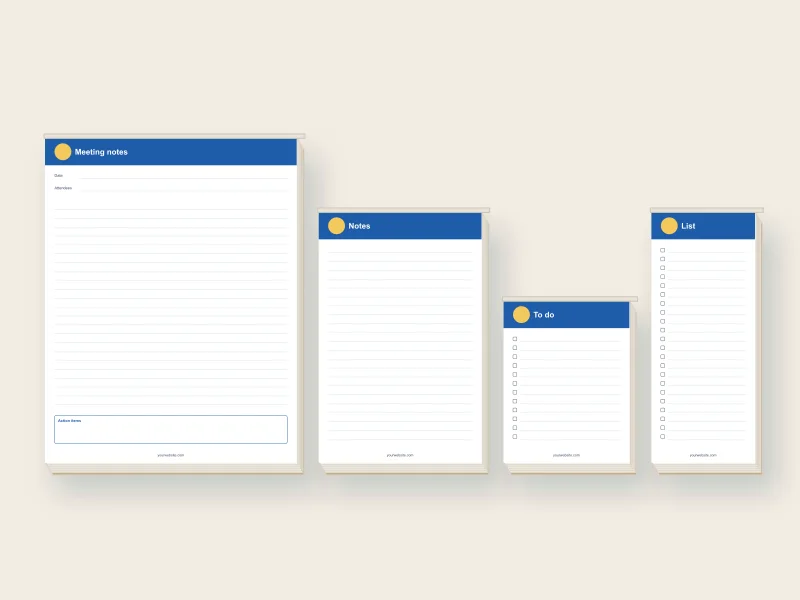
Starter layouts
The starter PDF has four pages, one for each size. Each page is already at its notepad's size with bleed.
| Page | Size | Layout |
|---|---|---|
| 1 | 4.25 x 5.5 in | To-do list with checkboxes |
| 2 | 5.5 x 8.5 in | Lined notes |
| 3 | 3.5 x 8.5 in | List pad with checkboxes |
| 4 | 8.5 x 11 in | Meeting notes: date, attendees, notes and action items |
Each has a header band with a space for your logo and a "yourwebsite.com" line at the bottom. Replace those with your own, or delete them.
Setup guides for each size
Use a guide as a background layer while you design, then delete it before you export.
Notepad setup guide, 4.25 x 5.5 in (PDF) (PDF) Notepad setup guide, 5.5 x 8.5 in (PDF) (PDF) Notepad setup guide, 8.5 x 11 in (PDF) (PDF) Notepad setup guide, 3.5 x 8.5 in (PDF) (PDF)| Size | Page with bleed | Safe area | Glued edge |
|---|---|---|---|
| 4.25 x 5.5 in | 4.5 x 5.75 in | 0.25 in inside the trim | Top 0.375 in |
| 5.5 x 8.5 in | 5.75 x 8.75 in | 0.25 in inside the trim | Top 0.375 in |
| 8.5 x 11 in | 8.75 x 11.25 in | 0.25 in inside the trim | Top 0.375 in |
| 3.5 x 8.5 in | 3.75 x 8.75 in | 0.25 in inside the trim | Top 0.375 in |
How to design a notepad in Canva
- Create a custom design at the bleed size from the table, such as 4.5 x 5.75 in.
- Upload the setup guide PDF and place it as the bottom layer. Lock it.
- Add your header, logo and contact line in the top inch, below the gray glue band.
- Add a writing area: lines, checkboxes or open space. Keep it light so notes are easy to read.
- Delete the guide, then download as PDF Print. Leave Crop marks and bleed unticked, because your page already includes the bleed.
Upload one page. We print it on every sheet of the pad.
Tips for a notepad people use
- Keep the header small. One inch is plenty. The rest is for writing.
- Use light lines. Gray or a pale brand color, about 0.3 in apart.
- Put contact details where they show. At the top or along the bottom of every sheet.
- Avoid dark backgrounds. Pen doesn't show on them.
- Stay out of the glue. Anything in the top 0.375 in ends up inside the glued edge.
Print it at home, or order pads
Print the starter pages at home for your own use. Cut on the trim line, or print several to a sheet with your printer's "multiple pages per sheet" setting.
For real tear-off pads, we print your design on 50 sheets per pad, glue the top edge and add a chipboard back, from 10 pads:
| Size | 10 pads | 25 pads |
|---|---|---|
| 4.25 x 5.5 notepad | $59 ($5.90 each) | $99 ($3.96 each) |
| 3.5 x 8.5 list pad | $65 ($6.50 each) | $109 ($4.36 each) |
| 5.5 x 8.5 notepad | $85 ($8.50 each) | $149 ($5.96 each) |
| 8.5 x 11 notepad | $129 ($12.90 each) | $249 ($9.96 each) |
No time to design? Send your logo when you order and we set it on our template for free. See all custom notepads.
More free templates
Questions
Are the notepad templates free?
Which apps open them?
Can I upload the starter page as it is?
Why keep text out of the top edge?
Printed and bound in Charlotte, North Carolina, and shipped to the contiguous US.